The solution to that is simple. Put four/five physical buttons down each side of the screen, maybe along the bottom too, and then you can make everything still programmable in software. I have no idea why you absolutely need to put buttons in the middle of the screen to be touched. It's one thing to put items or whatever that can be selected, or allow pinch/zoom, but in reality almost all interaction just boils down to picking between a limited set of options at any given time.
With a decent response time and hierarchical menus, it's easy to make a system that is navigable without looking. Throw in some (hopefully non-annoying) audio feedback, and it is extremely accessible--even by a blind passenger! In fact, that's a good benchmark. If a blind passenger could operate the thing, then the driver should be able to as well.
This. %100 this. The airline industry figured this out years ago with some of the cockpit controls. (admittedly there are a lot of other buttons and switches for the pilot to worry about too, but it seems like the digital display panels always are flanked by rows of buttons which were used for interacting with the panel. Works great even with gloves on and does not lock you into a single feature set.
Lab equipment does the same thing. Decades ago, oscilloscopes started having banks of buttons corresponding to an area of the screen, and knobs that have context sensitive functionality.
Those can be placed side by side with buttons that have fixed purposes delineated by printed or debossed lettering.
I realize that we're getting pretty far from the automotive use-case, but this style has worked remarkably well over the years, and has made it into all sorts of equipment.
A few months ago I met a teen (maybe 15 y.o.) who was trying to withdraw money from an ATM that had a non-touch screen. He kept failing and trying to tap on the screen.
He was doing it for his grandfather, a wheelchair user, who was nearby. The grandpa couldn't use the ATM himself because there was no wheelchair ramp. Seeing the teen's failing attempts he started asking passerby for help.
My takeaway from this story: we need more wheelchair ramps, not touchscreens.
Seconded. Touchscreens are great in many contexts but I have never liked them on atms. The latency between tapping something and the result might be the bank checking my account balance, or might be something wrong with the UI. When I'm dealing with money stuff I don't want any distracting ambiguities.
Having said that I like machines enough that I assume I can figure anything out because it was intended to be used by someone, so I rarely struggle unless it's a truly awful design. Touchscreens are way more intuitive for most people, though in cases such as you describe I wonder what the helpless people think the buttons outside of the screen are there for and why they're reluctant to try pushing them.
I suppose it doesn’t rain much in your area? Buttons tend to work even when moist. Touch screens tend to give you the wrong amount of money out of your bank account.
This varies widely depending on the issuer of the ATM, at least in my part of the EU (SW Germany).
My banking group has (I guess) >90% of their ATMs indoors; I can only think of ever using 4 or 5 locations that were outdoors (my dataset is probably something like 100 ATMs). But there are also some banks which seem to favour outdoor, or at least have less of a strict "indoor policy".
Especially "generic" ATMs at tourist spots or train stations seem to be outdoors.
When did you last vote? The 2016 election is when I first experienced them. I asked to vote by paper as I wasn't comfortable with electronic voting machines, so they gave me a paper and pen to fill it out, which I was then to feed into the computer.
That's not how it works outside the US. In Germany you fill out the bubbles and throw it in a ballot box. The cobtent of the box is later counted by multiple actual people. Results are very accurate and almost instantly available after voting closes. Thousands of voting locations, properly staffed, make sure of thay. Those preliminary results are later recounted and verified.
> I don't see how that affects the comments you're replying to in any meaningful way. They only mentioned a particular election to establish a timeline.
Because many countries won’t have had a meaningful difference in election systems in that window?
Commit... asked Swen... when they last voted. Now that question is only meaningful if the region Seen... lives in even uses e-voting, so Commit... seems to either assume that Swen... lives in the same country or that virtually all countries use e-voting.
Either option is US-centric - the first is pretty obvious, the second is more along "we do it like that, so all the others probably do it like that as well" (I'm US-centric as well, assuming the mentioned 2016 election was the US presidential election).
It's not like this is inherently bad or anything like that, it's just a remainder that sometimes the inhomogeneous composition of the HN commenters should be considered. And as you pointed out, that's also the case inside the US.
Also, others used the opportunity to state how their country/state uses (no) computers for voting. So there seems to be some meaning to it.
Maybe it's centric to CommitSyn's experience, but I don't think it's US-centric.
> the second is more along "we do it like that, so all the others probably do it like that as well"
2016 is quite recent for a first encounter anyway, so I don't see it as "we do it like that", just an anecdote that it's spreading. No "others probably do it like that".
I'm also surprised to see "electronic voting machines" referred to as something everyone ought to be familiar with. I've never seen one of this type. I last voted a year ago (it was a local election); the last national election was two years ago.
I have seen the bubble sheet type, but the voter interface to those is a pen and paper.
It didn't make waves here presumably because people are jaded with politics, but people in this sub-thread might be interested in this recent story about a quasi-legal effort to penetrate electronic voting infrastructure in the wake of the 2020 election.
The 1st election I voted in was 1987 and the last was a couple of months ago. For the 1st couple of elections I used the giant old school mechanical voting booths with the levers you threw to record your votes.. Since the early 90s I have only used ballots which I filled out by hand and then ran through an optical scanner before leaving the polling place. I imagine quite a few people in the US have never seen an electronic voting machine.
Last time I voted, there was a machine which spat out a paper where you could verify your answers, which was then fed to another machine for counting.
Seems like a reasonable path to me, though I'm still a bit distrustful of the whole process (I live in Texas currently, so Shenanigans(TM) are not out of the question).
That's only half stupid. The last primary I voted in I used a poorly-designed-by-committee interface which then printed out my ballot which I then fed into the scanner.
The style where it prints out a ballot which you feed into the scanner is actually not-insane. It's good for accessibility (e.g. lets visually impaired people vote without assistance) but still leaves a paper trail for recounts and things.
It is weirdly hard to have conversations about insecure voting machines these days. Progressive that care are sometimes shouted down by other progressives that are in favor of dominion suing fox. Conservatives that care are sometimes trying to justify disproven conspiracy theories about the most recent election.
It seems both sides have reason to push for voter-verifiable paper trails, but I'm not seeing a lot of momentum along those lines legislatively.
If you look at those MFDs, many also have rotational controls in the corners (some even have two levels of dials, one sitting on top of the other), which are another key way to keep the UI tactile and promote muscle memory.
Things like eliminating lag, organizing menus into predictable paths that can easily be committed to muscle memory, and designing buttons and dials that can be used even in high vibration environments, are all key design criteria for these cockpit controls. It's so sad that automotive design refuses to take any lessons from that industry.
When using the touchscreen in my old Nissan Leaf, I used to anchor my thumb underneath the display so I could hit controls reliably via muscle memory even when the road was bumpy. Preposterous that we have to do these kinds of hacks when there are much better solutions.
This comment reminds me of this video, where a F-15C fighter pilot breaks down the "Human Interface" in the cockpit where there are over 250 buttons and various other displays including HUD and panels and a button they aren't allowed to press because it requires an engine rebuild afterwards:
https://arstechnica.com/features/2020/06/human-interface-com...
It suggests it was meant to be part of a series but I've not found any other examples????
I was going to cite the example of the Garmin G1000 glass cockpit. Even moving a cursor around a map requires pushing a physical knob in 360° to guide it.
I wouldn't call the Garmin G1000 a paragon of UX design though. I wish there were some serious competitors that would give the UX another try (like Avidyne), but Garmin seems to be the standard now.
Philip Greenspun wrote about some of its problems (back in 2006):
> In some ways this makes life more difficult for the pilot. For example, suppose that you are busily trying to fly the airplane and study an approach plate when ATC gives you a new transponder code. With a less integrated system, you know exactly where the buttons are to enter a transponder code and your fingers will find their way there almost automatically. The buttons are always in the same place, i.e., on the physical transponder box, and they never change their function. With the G1000, you find the soft key labeled "xpdr" and press it. Then some more soft keys take on the function of digits. It is clearly a less direct and more time-consuming procedure.
Similarly for entering a frequency into COM 2. With a traditional radio stack, you reach over to COM 2, which is probably underneath COM 1 and labeled "COM 2". You twist the knob that is always there and that always adjusts the COM 2 frequency. With the G1000, you study the COM freqencies display (typically four numbers) and figure out which number is surrounded by a box. This is the number that you are going to be changing if you twist the COM knob. If the box isn't surrounding the number you want to change, you have to think long enough to push the COM knob to toggle between "I'm adjusting COM 1" and "I'm adjusting COM 2" modes.
> A 1965 Cessna has what computer nerds would call a "modeless interface". Each switch and knob does one thing and it is the same thing all the time. This is a very usable interface, but it doesn't scale up very well, as you can see by looking at the panel of a Boeing 707. Both the Avidyne and the G1000 have some modal elements. Knobs and switches do different things at different times. The G1000 is more deeply modal and therefore, I think, will always be harder to use.
> I wouldn't call the Garmin G1000 a paragon of UX design though.
In some ways I would.
I wouldn't call it "intuitive," but once you understand its semantics, it's phenomenally predictable in its behavior. And quite well thought through I think. Here's one of my favorite examples: On the MFD, in an urgent situation, two of the most helpful pages are the "map page," and the "nearest page." These are (unintuitively) the first and last page. Until you realize that that means you can access both without looking which page you're on by spinning the page knob either all the way left or all the way right.
It isn't perfect, but I find it generally well thought through.
I certainly can't argue with the points about transponder and com1/com2 inputs, but within the parameters for the device, I consider the UX for the G1000 to be ... maybe not a paragon in its entirety, but certainly much more thoughtful than what I encounter in other life daily.
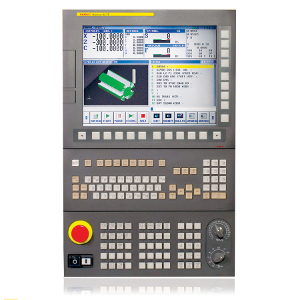
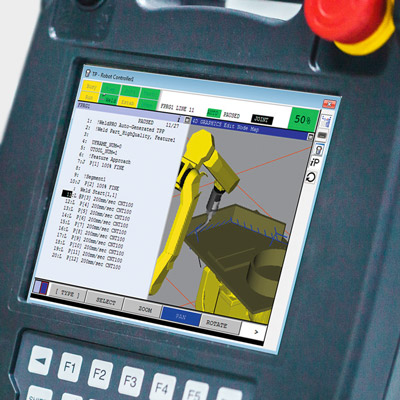
CNC, robotic, and industrial equipment too: Human-machine interfaces have rows of "Soft keys", buttons whose function changes depending on the context. Many machines used soft keys in the ages before touchscreens were available, but manufacturing is slow to change and even with the advent of multi-touch high-resolution color displays, they've remained. For examples:
I'm not so sure that's an optimal solution. If you are going to use the display to show the UI, you may as well just use touch interface, as long as it is responsive enough. Physical controls make more sense when they are optimized for ergonomics so that they can be used without looking.
> If you are going to use the display to show the UI, you may as well just use touch interface
This is just absolutely not true in practice.
Many synthesizers have the described design where you have a set row of knobs or buttons and what those controls do changes based on the current mode or state. A screen tells you the current function of each control.
It is much easier to build up muscle memory that lets you grab the right control and do what you want than it would be if you had to interact with the screen itself. The difference is so stark that it's hard to even explain if you haven't experienced it first-hand.
And this is for musical instruments used in live performance, often in the dark, where muscle memory and interacting instantly and correctly is vital.
Exactly, trying to use a software synth without some sort of hardware interface with physical controls becomes a nightmare very quick in any situation that isn't just sitting on your computer at 12am leisurely editing synth patches.
The same it turns out is true of steering a multi-thousand pound metal rolling deathbrick.
Even those kinds of modal interfaces with physical knobs/switches/buttons are often regarded as clumsy and aggravating compared to knob-per-function interfaces where everything control does just one thing and always that one thing.
I think the point here is that most people who use the interface a few times will learn the necessary key sequences. This learning can happen with the car at rest, and after that the user can keep their eyes on the road. It's not perfect, as some people have a slower learning rate than others, but it's sure better than a touch screen.
Well, if the control all change in meaning depending on the interface state, you can only memorize sequences if there is a reset somewhere. And those will probably be very cumbersome sequences.
A "home" is a reset. A "back" button won't solve the issue.
On a second thought, if the options are hierarchical, the sequence of clicks may not be cumbersome at all. Also, in a car the state can be something really easy to keep track of, like "the car is running", but even then, I'm not sure it's safe to rely on this.
Most of the ones I have used allowed you to navigate the UI using physical buttons on the steering wheel. Something similar to a up/down/select/back button group with some other specific buttons for frequent actions.
Yes, buttons on the steering wheel are ones of the most useful ones, though even they become capacitive e.g. in new VW, BMW, Tesla Plaid.
I have a VW car with a basic HUD (2015-ish era HUD, where a glass pops up). It can show lane keeping state, adaptive cruise control, current speed, recognized signs and navigation directions. Those features are essential for normal driving, so I don't look at all on the instrument cluster (either dials or the screen). The fact that you don't need to look down and change the focus of the eyes makes a significant difference.
That's fine if the controls work without significant lag. Last week I drove a minivan whose blower speed was controlled by a multi-purpose knob, and each speed change took several SECONDS to be affected. Pathetic.
> The solution to that is simple. Put four/five physical buttons down each side of the screen, maybe along the bottom too, and then you can make everything still programmable in software.
This, though functions like climate control, audio, and anything needed to operate the car while in motion should still have dedicated buttons. Touchscreens in cars are an abomination.
> I have no idea why you absolutely need to put buttons in the middle of the screen to be touched.
They don't need to, they're just following the touchscreen all the things UX fad. Turns out capacitive touchscreens were a great fit for cell phones, but that doesn't mean they have a place anywhere else.
Why are capacitative touchscreens such a great fit for cell phones? Because the physical size is so limited. You want to use the same physical space for output (screen) and input (buttons). For a car instrument panel, physical size mostly isn't a concern.
"Touchscreen all the things" was cargo-culting. Apple made a trillion dollars with touch screens, therefore we should use touch screens too.
There are truly obscure things in cars you don't do often. Changing settings. Programming the radio. Changing a drive mode for specialized off-road use. Getting a report on usage / economy / etc.
If an operation is infrequent and doesn't need to be made when driving, burying it in a touchscreen menu sounds great: conserve those physical control surfaces for stuff that matters so you don't have a ridiculous surplus of buttons. You can go and put the majority of functions on touchscreen menu hell. But don't go and put the climate or windshield wipers or even audio modes on touch surfaces, please. :/
> If an operation is infrequent and doesn't need to be made when driving, burying it in a touchscreen menu sounds great: conserve those physical control surfaces for stuff that matters so you don't have a ridiculous surplus of buttons..
That's a bit of a straw man. No one seriously says literally every function needs a button.
And it makes sense to bury seldom-used things in menus. However, there's no reason those menus need to be touchscreen menus.
E.g., in my car, care settings are in a menu, but the screen for it is in the instrument panel and controlled by buttons on the steering wheel. I believe the reason is when it was made they still offered a low-end trim level without a touchscreen entertainment system. This menu is better than a touchscreen, but IMHO it would have been better with done with menu-buttons in the center console screen.
It's not a straw man; it's nuanced agreement. It's a shame that people expect argument so much that they can't see where the edges of one opinion are being offered.
> However, there's no reason those menus need to be touchscreen menus.
Might as well be touchscreen menus. Using up and down buttons to pick things in a modal interface isn't clearly superior to a touchscreen for experienced users and worse for new people.
A good button menu system is better than a bad touchscreen, especially with experience. But in a rental car, I appreciate the touchscreens to pair my phone, etc.
> It's not a straw man; it's nuanced agreement. It's a shame that people expect argument so much that they can't see where the edges of one opinion are being offered.
I understand that, that's why I said it was "a bit" of one.
> Might as well be touchscreen menus. Using up and down buttons to pick things in a modal interface isn't clearly superior to a touchscreen for experienced users and worse for new people.
I like avionics and ATMs where you see these. They're great for experienced users with relatively fixed functionality.
You can't tradeoff UI factors so easily, though. If you usually have 5 options, and found you have 6 somewhere-- you need to break up the section or add a page, etc. And if you add an option the user UI workflow completely changes.
While, with a touchscreen you could accept a smaller target for the least-used option, and adding a new target on a page doesn't change things too much for users (and is arguably more discoverable).
And speaking of audio, make the volume control a real analog knob that's directly in the output circuit, so when I quickly spin it down it immediately goes down. Not some encoder that's trying to rationalize how far down I really meant to turn it, with an inevitable delay.
> make the volume control a real analog knob that's directly in the output circuit
I don't miss noisy potentiometers :D
And having a bus with user operations being streamed to it means that designers can choose mappings and behaviors late.
The issue is the delay. I have a lot of amplifiers with knobs that are perceptually instant, even if they really are encoders behind the scene. Stuff is fast enough now that there's no reason for delay. I've built control systems that use encoders that operate at 1000Hz over slower embedded networks than are in modern cars.
And stop having bizarrely chunky steps between volume levels, too. It annoys me regularly that so many of my digital devices have less than a dozen steps between minimum and maximum, leaving me with either too quiet or too loud, and nothing in-between.
Half a decibel per step is a reasonable chunk; average perceptible change is 1dB but sometimes it's better than that.
Figure maybe 65dB of useful dynamic range in a car + 10dB of range needed based on levels of the recording. That implies you want about 150 steps.
Go ahead and display a number between 1-30 if you want-- that's probably good for usability. I can find "13" and be close to what I typically want. Just, have the actual control surface move 5 steps per number so that I can fine tune.
If you’ve ever rented a car in another country, you will find yourself in those menus. Probably while driving. The best cars are when the menus are easy to get to, using buttons on the wheel.
> But don't go and put the climate or windshield wipers or even audio modes on touch surfaces, please. :/
I agree with that, but I don't see any added value of a touchscreen for the other things you mention. It could as well be a deep menu that is still accessed with many button presses to drill down into it.
And even then… there were people that still preferred the physical keyboards on smartphones even as they fell out of fashion because everyone was chasing apple.
Swipe keyboards are good enough and physical keyboards are out of fashion long enough that it’s been a while since I’ve seen an bluetooth keyboard build into a phone case. But I haven’t actually tested my preference in years.
Car manufacturers are not cargo-culting Apple as much as Tesla. People in industry saw touch screen and went meh, but then people voted with wallets and opinions (Tesla has one big touchscreen, so modern, so much wow, lightyears ahead of everybody else! - heard it gazillion times in the past, no matter how much I tried explain to folks how utterly shitty and cheap that approach is in cars).
In similar way as current/recent SUV cargo-culting. For premium performance manufacturers like Porsche or BMW it didn't make sense, why have bulky car with shitty driving characteristics, slower, much higher roll risk, much higher center of gravity, much smaller inside space than usual family wagons, that costs more to run and buy it from premium brands... thats what you have Fiat Peugeot etc for. Especially for people who drive on paved roads 99/100% of the time, ie typical soccer moms.
I know that inexperienced drivers enjoy higher seating position and feel safer, but I would suggest taking some driving lessons if thats a problem for a given driver, much better results and resulting real safety.
Yet Cayenne and X5 and whatnot sold like hot cakes for premium money because footballers and other celebrities bought them, so eventually every manufacturer jumped on that bandwagon, screw any logic if people buy it. The more performance the brand, the longer it took them to pick this trend up, and thus Ferrari is the last (from what I gathered, not following this topic seriously). And so folks today buy crossovers and god knows what other names are in vogue these days, which are tiny short cars with high ground clearance. To drive in cities.
Even an experienced driver can appreciate not having the view completely obstructed by the clouds of droplets from the wheels of other cars in a rain and no amount of driving lessons can make one see through the water. On top of better visibility in all weather conditions, SUV offer easier loading/unloading, easier access for setting up children in the child seats and, even though not an off-road vehicle, still much better in the adverse weather (snow, floods) because of high clearance. If you're are not racing the only reason to choose a wagon is the few more cubic feet of room are more important to you than anything above. This is why SUVs displaced wagons IMHO, I doubt people buy so many RAV4s and CR-Vs in the US just because of some footballers who bought Uruses.
> Even an experienced driver can appreciate not having the view completely obstructed by...
Couldn't agree more. I have ~50 hours of seat time driving a high performance mid engine car on a track but in any amount of traffic I prefer my truck. Better visibility, and (imo) better safety due to weight.
It's rarely brought up but even an elementary understanding of physics makes it obvious that less massive things are more fragile and susceptible to deformation than more massive things, all else being equal. Sadly that last point involves a zero sum game: the safer a heavier vehicle is to its occupant the more dangerous it is to others. Even more sadly its a game many people are forced to play.
One needs to be careful when analyzing safety. NHSTA and similar orgs abroad have conditioned people to only think of safety as the chances of survival in a collision but if you were to look at the actual traffic fatalities [1] you could easily find that some cars with higher fatality stats have also a higher "safety star" rating and vice versa. Likewise, some heavy trucks score higher fatalities than lighter cars. It might be that some cars are better at avoiding collisions than the others.
Touchscreens let you build arbitrary UI/UX. You can click anywhere and do gestures anywhere and type anywhere. When there doesn't need to be UI, like when watching a video, the whole phone is the screen. So the UI can optimize for the best UX. It's much more powerful.
With physical buttons, software is pigeon-holed into UI designed around those buttons. It's a massive trade-off. Something we take for granted like navigating a website becomes much more tedious when you only have buttons.
Just look how much effort goes into making software-specific hardware like the scroll wheel/drum on old-gen music players like the iPod, yet it doesn't solve something as simple as typing in a song search query.
I would love a cell phone in a Multi Function Display(MFD) format A row of soft buttons down each side(a software ecosystem that expects soft buttons is also needed).
It would be great, there is very little in the way of a worse UI than trying to use a touch screen in a moving vehicle.
> "Touchscreen all the things" was cargo-culting. Apple made a trillion dollars with touch screens, therefore we should use touch screens too.
IMHO, that's one of Apple's biggest competitive advantages. They have so much cachet that everyone assumes whatever they do is "best" and mindlessly apes it. That way they never have any real competition, because followers are always at least a step behind.
> Turns out capacitive touchscreens were a great fit for cell phones
Yes but to be clear they are still an enormous compromise there. Maybe it is this generation of UX people, maybe it is fundamental to the technology, but there hasn't been much advancement in touch interface tech in years. Apple tried "deep touch" or whatever with feedback but then abandoned it because nobody (users or devs) wanted to deal with it. We just deal with all the downsides of touch screens because the rest of the device gives us such an incredible capability, even with the (sometimes literally) painful UX.
I disagree. Increased screen size as a result of removing physical buttons makes up for the loss of physical buttons in my view.
You can now watch a movie, play a game, even browser a crappy website with desktop-only layout on an iPhone Mini. Try to do this if half the screen estate is replaced with physical button.
I am a big fan of physical buttons though, I which apple would add more of them on the sides, with some programmables, that would be awesome. Some Android devices have this for example.
Another solution is to not make every make and model have a completely custom dashboard interface. The physical interface for turn signals is completely standardized. The physical interface for windshield wipers is about 95% standardized (I wish we would finally decide on if the short bar or the long long bar indicates frequency of activation or delay between activations). The physical interface for the radio is mostly standardized, at least the icons on the buttons are well defined and understood. It just gets worse from there. The climate controls look standardized, and often have well-established icons and coloring, but not standard positioning. Then again, even things that are standardized, people can't fully grok: how many people know how to find out which side of the vehicle the gas tank is on while sitting in the driver's seat? It's so goofy, the Mini I drive regularly is infuriating because the touchscreen has a paddle/joy-knob in the center console for navigation, and you turn it COUNTERCLOCKWISE to move "forward" and "down" through menus/option lists.
>> how many people know how to find out which side of the vehicle the gas tank is on while sitting in the driver's seat?
Is there actually a way (apart from pulling a lever to open it and looking in a mirror if it is the type which flips open)?
The symbol on the fuel gauge indicating the side of the tank opening is a myth isn’t it? Doesn’t consistently hold true for my car, and people seem to remember the version the does - does the hose indicate the side of the flap or the side the hose needs to be on?
Encoders are great for this too. Music hardware often uses mappable encoders with LED rings to indicate the current value, and/or with the screen showing what the encoder is controlling.
Yep -- my favorite version of this is in the Ensoniq ESQ-1. 1980s box that helped pioneer the use of digital readouts in synths. Digital readouts eventually became terrible in synths because of "menu diving" (look into the Yamaha TG-33 for an awful example). But the ESQ-1 had a few cool features to keep editing simple:
1. The entire page hierarchy was only one level deep. You had 10 buttons that select a parameter, and a single data entry slider. So, with two hands, you could very rapidly manipulate parameters. I believe the Yamaha DX7 also had this, but what made the ESQ-1 cool was that the button usages were listed right on the digital readout next to the buttons themselves, rather than off to the side and hard-coded to the parameter. So it was like hitting a hardware button that could automatically remap.
2. Again unlike the DX7, there was no button-press needed to "edit" -- you just hit the button and moved the slider. It felt very natural to use even though it was technically a digital parameter being editing. If you needed additional editing power, you could still hunt for the other buttons outside of the 10 "screen" buttons.
I had one about 5 years ago, and swapped it for a JP-8000. I regret it. Very cool synth, very innovative UX.
Even for buttons I've seen small matrix displays beside the button (or even underneath its plastic shell) acting as the label and indicator. This prevents the need of having the programmable buttons next to the screen, but at increased cost.
I have a Roland FANTOM keyboard which has a touchscreen UI, however it also has a row of knobs and buttons that offer an alternate control surface without having to touch the screen. It's so much better.
> With a decent response time and hierarchical menus, it's easy to make a system that is navigable without looking.
There is a difference between working with a touch screen where you can focus on it and using a touch screen where you need to focus elsewhere (like the road). There is also a difference between something like a plane where you have a great distance from other moving objects most of the time and a car where you are regularly around other cars.
My wife has a slightly older car with no touchscreen. We can operate it by feel. Without ever needing to take our eyes or focus off the wheel. My car has a touch screen. I can't operate that by feel. Constant glances are required.
These are different experiences. Looking at the situational environment is important when creating a good user experience.
I wish I could buy a car with more physical buttons. Would make the whole car driving experience more usable with me as a less distracted driver.
Those same systems are used in jet fighters and ground attack planes where they (along with a HUD - another thing now available in cars) are used to support split second decisions.
Having tactile, easily memorized controls with screens is a solved problem in the avionics industry. It's just that car makers refuse to learn any lessons from them.
BTW, what you are describing has a name: "Soft keys", and had first been developed for use in air plane cockpits. (<https://en.wikipedia.org/wiki/Soft_key>)
Computer keyboards have had them for decades also (PF keys, labeled F1--F12), though I've only really seen them used on mainframe terminals and old DOS programs like WordPerfect.
As you say, not much seems to make deliberate use of them as a constant feature such that you could expect familiarity to be rewarded. So, with the Functions on keyboard they are usually a lucky dip.
Soft keys specifically have an intuitively understood relationship - usually through physical placement - with the screen to link them to their purpose. The "softness" is about the keys purpose, as it can change depending on context of the screen.
A key without a intuitive link to the patch of screen, is just another F-key...
Even commercial and fighter aircraft -- which have human-interface requirements of incredible depth and complexity -- are transitioning to large touchscreen displays. ALL of which require physical boundary buttons and knobs as a redundancy for touchscreen controls.
In fact, controlling the screens via buttons are the preference for many pilots since accurately fiddling with touchscreens during turbulence, pulling Gs, evading missiles, while being task-saturated etc is very hard to do, but doing the same with physical buttons is far more reliable. Button-pushing tasks can be performed from memory in the blind (or while not looking) (a.k.a. "memory items").
There's always been a dichotomy in human-machine interfaces between airplane customers (airlines, charters, governments, and militaries) vs. their own pilots. Airplane builders have to keep up appearances and look cool by putting in putting in flashy, futuristic features like big screens and AI, and ditching old button-laden displays and the "old way of doing things." It too often disregards the needs and wants of pilots and "human factors" engineers. Fortunately, safety comes first, so the buttons and redundancy must stay.
FWIW this is what Audi's MMI does. (Or used to do? My car is old.)
The control panel has:
* 6-8 buttons for switching between different MMI modes, labeled
* 4 universal buttons, function contextual to the current screen
* 1 return button
* Turn/press controller
I can navigate 90% of the menus blindfolded. Despite my older MMI not being a marvel of UX, I can access functions 5 actions deep, while driving, from pure muscle memory.
Audi's phased out the entirely physical-button driven interface in favor of touchscreen and trackpad-based inputs. There was a generation in between that also had an odd and extremely large implementation of the legacy combination dial/joystick/button thing.
That sucks. Touchscreens have become so cheap (because economies of scale), Audi is probably saving manufacturing cost by not having physical buttons, simply because of the custom design cost of integrating buttons into a PCB and then programming it[1]. Touchscreens might even be cheaper than non-touch screens. They often have higher resolution. Audi is probably transitioning to using software stacks designed to build touch-screen apps instead of buttons and don't want their software devs to even think in that outdated mode of "buttons". It's completely self-serving and chasing the design trends, tripping after Tesla tech woo, not consumer demand.
[1] Which is totally ridiculous IMHO, because even with my completely amateur skills, wiring up a few buttons to an embedded chip is NBD.
I f'in hate this thing. I've used it on my partner's car, and it doesn't compare to a few real purpose driven buttons. Try adjusting which vents are blowing, or something like that. Total PITA!
Audi have had this for years, dial with four buttons around it down by the handbreak so you don't have to reach up. Also some industrial pick and place machines work this way, I used to operate them over 20 years ago and the speed you could navigate through the screens once you built a bit of muscle memory beats any touch screen.
Dedicated, single-purpose buttons that work all the time are clearly superior to touch screens. That's why even smartphones have them.
Context-sensitive buttons are less awesome. They might be superior, if you memorize the combination, but they're decidedly inferior to touchscreens for the long tail of infrequently used features.
The study linked here focused on "simple" tasks, and the top performing cars probably have dedicated buttons for everything measured. The story would likely be very different for context sensitive buttons, and subjective reporting would likely be unreliable, if studies on the speed of mousing vs keyboarding are anything to go on [1].
More to the point: the missing physical buttons that really grind people's gears are gimmes. You need some way to control the heating and air. Some way to control audio. Some way to control safety stuff like wipers and signals. These have been around as long as the things they control. Decades! It is known. This is the way.
Give those physical buttons and 99.999% of complaints vaporize, and people are happy. Apply your idea for stuff that's up in the air. Boom. Done.
A central rotating knob or directional jiystick that can be pressed is also fairly intuitive. I fortunately they've futzed that one up often too by making it rotate and a directional pad (such as in Honda Odysseys, at least circa 2017), where you can rotate and also tilt the knob left or right, and I can never remember whether a particular menu section wants one or the other to change selections.
To the automakers, when two controls have overlapping things they're good at doing, maybe pick the one that fits best and just include that, but at a bare minimum make sure they are always used consistently and clearly, please.
* a row of programmable buttons with LED or lit e-ink screens for software developers to go nuts with =) – and for end users to customise to their preference.
* static physical buttons for basic functions (climate control, wipers, cruise control, volume, etc.)
And of course a large touchscreen with buttons on the sides as well.
ok, ok, it’s probably too expensive… As an option maybe? Let the end users vote with their wallets.
General-purpose buttons whose action changes with context are just as bad as touchscreens. The whole point of tactile interfaces is that the buttons and controls have a consistent action regardless of context. A button that sometimes does one thing and sometimes does another depending on what is on the screen is no better than a touchscreen, since it requires active attention to operate.
It just requires context. How that context is critically important. If it is a hierarchical menu, then the context is the navigation path (i.e. the sequence of previous button pushes, each of which transitions from one state to the next). Importantly, with a fixed hierarchical menu, the path to a button's functionality doesn't change and can be memorized. With some audio feedback, the current state can also be announced, so that a person's mental state matches the state the interface is in.
There are several problems with touchscreens, not the least of which is the context issue. The next issue is there is no tactile feedback, which requires you to look at where you are touching, often because interactive things can appear anywhere.
Doesn't this assume that you're advancing a state machine from some known initial state? If you are in the middle of a navigation and you are interrupted, in order to figure out what to do next you need to recover context. The more your muscle memory remembers the sequence ( 1 -> 2 -> 2 -> 3/4 for raising/lowering the fan speed ) the less you'll be able to access it consciously and the more you'll have to look at the options to figure out what to do.
The lack of tactile feedback on touchscreens is an issue when using it, but I'm not convinced that it's any better or worse for partial-attention tasks. For full attention tasks (e.g. navigating a settings menu) it's far superior to a button-based approach.
In the context of operating a vehicle I'm going to stick with "just as bad".
When you aren't driving, if you have to set up something (like configure the doors to auto-lock when when you shift into drive or something) then a touchscreen is clearly superior. You can navigate to a menu and read the options and select the appropriate one. But like the camera shutter button, this is a situation where you can afford to pay some attention to the task at hand.
While operating a vehicle, if you're trying to turn up the fan on the A/C, then using a button to switch to climate controls, then using a button to switch to fan settings, then clicking the up button three times, is just as bad as a touchscreen, because if you switched to climate but didn't yet switch to fan settings, and you have to put more attention on the road because you're exiting, you've lost context and can no longer know where you are in the navigation with looking and assessing the situation.
So dedicated climate controls >>>>>> touchscreen or context-buttons. The difference is close enough to be indistinguishable.
If you get a popup saying "there's traffic ahead click here to accept a new route" then dismissing it by jabbing the screen and dismissing by jabbing a button, it's really hard for me to see a lot of air.
Sure, I don't disagree with you here. Climate control should be dedicated buttons.
There's a place for middle ground though: sequences of button presses.
For instance, keying in 1-3-4 to enable this or that feature (where the buttons are 1 to 5).
It can be done purely by touch, but it'd be hard to discover and memorize such sequences without a screen. However, once you discover them, you don't need to look at the screen.
The solution is to have a "mode selector" so that the buttons have a fixed meaning in that mode. Like a 3 position rotary selection switch, all the way the left could mean basic AC control.
I'd love buttons with braille on the surface so I could read what they said without looking at them. Does someone make mems braille screens?
*edit, looks like there is a bunch of stuff in the works
Absolutely. I have a 2016 Outback with a touchscreen that I can't see in sunlight about 90% of the time. I can, however, see the smudge on the screen where I press play for audiobooks. (Plugging a phone in pauses the audiobook.)
I'd love more physical buttons because, and this may come as a shock, usually when I need to use these darn things, I'm driving.
Is there a standard for this or any defaults in an OS for this? In the past, I've been monumentally frustrated by the inability to bind inputs to non standard keys.
I've tried building out several projects like this, and using HID keyboard as standard, you are relegated to ANSI keystrokes or combos that a user/os wouldn't need, or third party drivers that come with their own headaches. Another option is a video game controller.
I never understood why we can have a billion emojis but adding some additional unused input mappings is a bridge too far.
The problem is that it’s contextual, so you still have to look to it you can trust that a hardwired button won’t change purpose; that’s the important property here.
This is not a solution. You still have to look at (or listen to???) the screen. But now you also have to find and operate one of several identical input devices that are not colocated.
This works for cheap oscilloscopes because you're not simultaneously driving a car. What you're proposing would make the safety issues worse, and probably be unacceptably frustrating for most people.
That's not a panacea. My Honda CRV has buttons along the side of the screen, and after seven years of owning it, I still have to look at the screen to do anything.
Exactly. Back in the hardware days of music technology, I had an Akai S2000 Sampler. I could navigate the most commonly used functions by touch alone, using actual buttons - even with complex menus.
With simple menus (or a custom setup of your own), the common things could be on buttons, instead of taking your concentration off the road.
Because unlike airline and medical industry, the auto industry does not have regulation around user experience.
Normalized functionality is required by law for air and medical to reduce risk of operator error.
The auto industry does not have to consider a confused operator killing someone else. That risk is on the individual driver, not a hospital, airline, or airport.



With a decent response time and hierarchical menus, it's easy to make a system that is navigable without looking. Throw in some (hopefully non-annoying) audio feedback, and it is extremely accessible--even by a blind passenger! In fact, that's a good benchmark. If a blind passenger could operate the thing, then the driver should be able to as well.