Writing an editor from scratch is a lot of work. That's one reason why I would use an existing editor whenever possible. For example, TrenchBroom (Quake editor) + func_godot seems to be getting more popular among Godot users, and Tiled looks pretty good for 2D games. For game data management I've seen CastleDB (never used it though), which now seems to be integrated into Hide, a full-blown 3D editor.
Either way, once you get the tooling up and running, the next big step is actually designing a game and creating all the content. :)
One thing I particularly like about Krita is its wrap around mode. Very useful when making seamless textures! Another thing is that its file format contains a merged image, which can easily be extracted (.kra and .ora files are zip archives). I've used that to add native .kra/.ora support to a game texture conversion tool. .psd support took a lot more work in comparison.
During the pandemic I got back to an old hobby, creating Half-Life levels. I found that certain things involved a lot of repetitive work, so I started working on some automation tools.
For textures and sprites, I made WadMaker and SpriteMaker, which can convert a directory full of images (including Photoshop and Krita files) to the specific formats that HL uses: https://github.com/pwitvoet/wadmaker/
For creating levels, I made an automation tool named MESS (Macro Entity Scripting System) that can do things like covering terrain with props, simplifying level scripting and automatically applying workarounds for known bugs: https://pwitvoet.github.io/mess/
It's been very educational (and fun), learning about color, geometry and making programming languages.
Perhaps it was Pro Git's chapter 10: Git Internals(1)? I once used it as a guide when writing a basic 'git inspection' tool and definitely found the whole experience useful for getting a better understanding of Git.
It's interesting to see other people still making tools for HL, even after 20+ years!
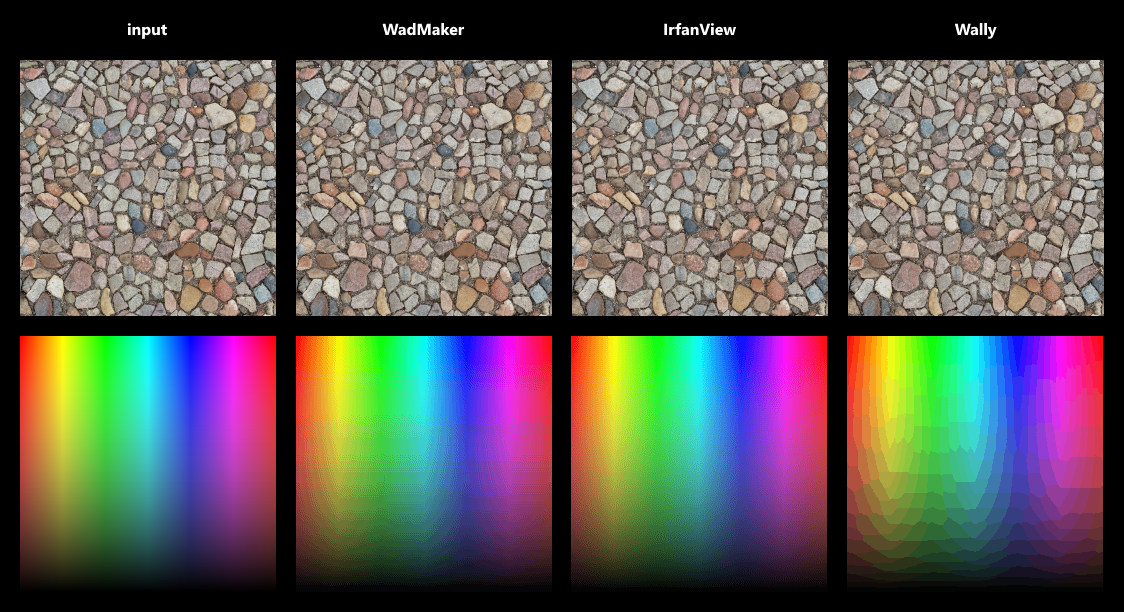
Unfortunately sorting colors by frequency and then taking every Nth color causes a notable loss of quality. A median-cut or octree-based algorithm is more suitable, and dithering can further improve the results. For the tool I'm working on (WadMaker) I settled on using a modified median-cut algorithm and dithering with an adjustable scale. This produces results that are on-par and sometimes better than Wally, though for images with lots of distinct colors and gradients I haven't been able to beat IrfanView.
One thing that surprised me is just how deep this subject goes. Color clustering, perception, gamma correction, non-linear vs linear color spaces... the more I read the more I realize just how much more there is to learn.
Indeed goes deep it was the first time I look into code doing something like this done, Joe the original creator wrote a tutorial for his method whic:h helped me understand it a bit
https://www.j0e.io/tutorials/wad3-format/
I'm not that good when it comes to algorithms and such so I can't say I can replicate the method by myself in other languages for example, That's why my additions were only the redesign and minor features like search and exporting
Oh and maybe y'all can talk about the parsing etc, that's his website I linked above, when I emailed him he said he forgot about the project since no one ever mentioned it (despite being the only HL WAD editor that works online I found)
Ah, so this is a revamped UI for Joe's tool, I've seen his website before. I think the main reason why his tool didn't get much traction is that it didn't offer any tangible improvements over existing tools. Wally, one of the oldest available tools, set a pretty high standard right from the start. Later came Half-Life Texture Tools, which added sprite-making capabilities, so it became popular as well. And recently, I made WadMaker/SpriteMaker, which enables a much faster workflow by removing several tedious steps (no more exporting files, adjusting palettes, manually managing wad file contents, etc). People are finding it useful so it's slowly getting some traction, but it has also taken several months of working on updates, writing tutorials and helping people out.
The wad and sprite formats have already been documented by others (most notably by Yuraj), and if you're a bit familiar with the HL modding scene then it isn't hard to find source code that deals with these formats, so parsing was actually one of the easier parts. Figuring out how to convert true-color images to 256 colors without too much quality loss was much harder.
If you're interested, here's how I'm making palettes: https://github.com/pwitvoet/wadmaker/blob/master/Shared/Colo... . It starts with creating a color histogram (the 'frequency list'), and then it treats these colors as 3D points within a 256x256x256 'RGB cube'. It calculates the bounding box for these colors and then splits this box along the longest edge. It then takes the box with the most colors and splits it up, and repeats that process until it has created 256 boxes. Ideally, these boxes will all be fairly small, which means that they contain very similar colors. A palette can then be created by taking the average color of each box (weighted by color frequency). When combined with dithering this produces quite reasonable results: https://raw.githubusercontent.com/pwitvoet/wadmaker/master/d... (but clearly there is still room for improvement!)


Either way, once you get the tooling up and running, the next big step is actually designing a game and creating all the content. :)