A locksmith came to let me back into my apartment the other day. He told me that because the front lock was a 'commercial' lock, he'd have to charge me $50 extra. I asked him if he would charge the same if he used the same lock-picking technique on a residential lock (since this was a residence); he said yes. So then I asked him what was so special about a bump key for this lock versus a residential lock, since they're both just blanks cut to five-nines and this lock has no anti-bump pin. He said, nothing special. So I asked him, since the bump key works exactly the same on either lock, why was he charging me an extra $50?
He ended up dropping the extra.
Security is not a Dark Art, and there is no harm in teaching people how or why attacks work. If you can find it at a bookstore or via a Google search, it's safe to disseminate to the general public via blog.
This is pretty standard wireshark stuff; showing data that was on an unencrypted network.
What I've been wondering about for a while now is, can wireshark show data on an encrypted network, assuming it has the key? Can wireshark take a known WEP/WPA2 key and use it to decrypt the packets on an encrypted network on the fly? I haven't found any CLI's or GUI's that have been able to do this out of the box. But surely someone has made this somewhere.
Wireshark is straightforward for revealing data on unencrypted wireless, but I haven't discovered how it could be used to monitor network users when someone has deciphered the key unbeknownst to the users who assume they are operating on an encrypted network such as WEP/WPA2.
Does the nature of the encrypted handshake make this impossible?
Thanks, I'd been wondering this in the back of my head for a while, last time I searched for some reason I couldn't find much.
edit: Now that I see the wiki, I remember correctly that the version of Linux I was using didn't work with this feature in the GUI. Maybe I'll look for the CLI version again soon.
I feel like there is a major opening for access point makers to simplify 802.1x rollout for all networks. Now it requires a whole bunch of steps only IT admins can do (RADIUS server, etc).
Maybe your new Dlink router comes with an 'app' which generates unique logins (with optional expiration times) that you can give out to users. There's a whole market of coffeeshop/restaurant wifi providers but they usually use no/shared encryption and a captive portal for managing authentication. That's great for dispensing logins and handling expirations, but is horrible for your user's security and user experience.
Well, if your traffic is mainly facebook domains, then you're chatting with friends. If you're visiting wikileaks and freedom.press you're an armchair freedom-fighter. And if all your traffic goes to random AWS IPs packed in encrypted VPN frames, then you're most definitely a terrorist.
Assuming I wasn't a state actor and just a lowly hacker on a wifi connection, here's some things I can tell about your VPN'd connection:
* The operating system used
* Application-specific traffic patterns
* Content-specific traffic patterns
* The VPN provider and type
First off, I know you're using a phone, because it matches mobile device tcp/ip fingerprints. Second, I can make a reasonable guess about what kind of VPN you're using, both based on the service itself and its traffic or connection pattern. Third, I can make a guess about what kinds of applications you're using, because you are using a phone and the traffic looks a certain way for certain network applications. Fourth, I can guess what kind of content you're looking at, since I have a good idea what kind of browser and application you're using. Fifth, if I can match up all those fingerprints each time, I can identify you as the sole user of that connection, meaning I can now track you whenever I see your traffic. Sixth, by manipulating your traffic in small ways I can also determine more about your host and application(s) by how they respond to network transmission problems.
Based on all that, I can send you a phished e-mail that looks to exploit any of the services or hosts or applications you're using. I don't even need to know who to e-mail; I can just spam tons of addresses and check for results that match the fingerprinted services I discovered earlier.
Another fun attack would be to actually kill every connection you tried to make over a VPN using a specific application and content provider; because it would never work over the VPN, you might eventually try it over your regular connection, giving me a new point of attack.
Digital Ocean has a great tutorial on setting up OpenVPN [1]. I've used this and gotten decent latency and good throughput over both broadband and LTE service using a small ($5/month) VPS.
The author seems to be making the assumption that the "target" is an unencrypted network. They provide no information on wireless network security and its effects on the attack and the conditions that need to be met for someone to be able and perform it.
Protected networks require more effort depending on the method used, WEP is utterly broken, WPA/WPA2 can be broken but require considerably more effort and processing power. More concrete methods exists (802.1x) but are almost never used outside enterprise or educational facilities.
Finally, the chances that reversing an ip address will result in a correct hostname is most likely never the case.
The author is either very ill informed on how wireless networks actually work or is trying to make people scared without explaining why these things happen and how they can protect themselves - any of which I really do not like.
Encryption of wireless isn't really a barrier, it can be easily broken. As its very rare to not have a shared key, once you've joined the "encrypted" network you can see all the traffic flowing through it.
WEP stands for wireless equivalent privacy, and it is. its trivial to break. (just like monitoring wired connections)
There are many unencrypted networks around: hotels, cafes, hotspots at airports and train stations, inside trains and planes and even cities start to provide their own wireless networks. And I expect less than 10% of the regular users to use VPNs or to keep track of only using HTTPS (or secure connections on other protocols).
Also keep in mind a lot of people have their phones/laptops set to join any available wireless networks without asking them, making a spoofing attack a lot more easier.
So I don't know anything about this stuff but looking at the XKCD example it looks really easy to see virtually everything my neighbours are doing on the web. What am I missing? Or is it really this insecure to use wireless?
Encryption. Your neighbours hopefully have protected their wifi with a password. This prevents casual snooping but of course can't really keep out a dedicated attacker. There are automated tools to break WPA encryption.
Additionally, if your neighbours are browsing using SSL/TLS then you theoretically cannot eavesdrop on those sessions.
Are you saying if the neighbours use an encrypted connection it makes it impossible to just look at packets and see for which host they are or where they are coming from - i.e. the XKCD example as given doesn't work then anymore?
If they use WPA/WPA2 the WiFi signal is encrypted so can't see anything without the key. You can make assumptions about the traffic volume and the involved machines but the data is insivisible.
If you are able to get the key or they use no encryption or WEP you can look at the packets and get metadata for SSL sessions and all unencrypted traffic.
agree and adding: i recently learned the Key is different to the password to associate, ie you must capture the session key exchange when each client device joins the network, it's not just enough to know the network's passphrase. If you know the passphrase and capture the key exchange, then you can decrypt traffic. My local coffee spot runs a public/guest WPA network, even though we all know the passphrase, even plain text traffic is moderately secure. I guess forcing a key-exchange is possible, but just sharing what i recently learned. I think it's called EAPOL. https://en.wikipedia.org/wiki/EAPOL
I've been thinking about this a lot lately. The ideal solution seems to be to encrypt traffic between all hosts on the local network. Are there any good resources for how to setup IPSEC or something on a local wifi network?
The solution already exists in the form of WPA2-Enterprise auth (802.1x), but support is still fairly sparse on consumer devices like cheaper WiFi routers or media streamers. It's also difficult to configure and manage, for the average user.
"If you’re wondering why the network card has access to all messages on the network, consider that you need to see every message in order to determine which ones you are supposed to receive."
Whuuut
I'm not sure what's causing you confusion. In an over-the-air situation you need to grab all the traffic to ensure you aren't missing something addressed to you. Once you grab the traffic, you can drop or otherwise ignore traffic not meant for you.
This is why wifi is segmented into channels: to reduce the number of packets that devices need to sift through.
This is how Ethernet works. Wireless is somewhat similar to a hub vs a switch. The spectrum is mostly a shared medium, just like 10baseT networks, or Ethernet hubs.
People forget this. You can make your wireless AP as secure as you want, but if we're plugged into the same node with our cable modems, you can just run a regular packet sniffer with ARP poisoning and see all the traffic to your neighbors. Not sure if that works with DSL connections or not.
Mostly not possible. DSL has multiple deployment modes PPP (over Ethernet or ATM), Bridged, and routed-bridge encapsulation (RBE).
The upstream router at the ISP is usually connected to an ATM or Frame Relay link, where they create virtual circuits to the DSLAM for each customer/modem (DSLAM is the last "network" device between your DSL modem and the telco -- it's the thing doing the Analog/Digital conversion from ATM/FR/Ethernet to electrical signals on the copper pair).
Since DSL works over a copper pair (phone lines), and you already know phone lines are not shared with your neighbors, there is no chance in intercepting your neighbors traffic over DSL, without someone physically splicing.
However, when ISP router is in plain bridge mode (i doubt anybody does this any longer, RBE so much more effective), there is possibility that the router floods packets for addresses it doesn't know, just like a switch does when it doesnt know where a certain MAC address is. This would broadcast that frame out across all the "virtual circuits". Most DSL modems would then also filter this, so unlikely you would still be able to observe it, unless you had control over the DSL modem/bridge itself.
Sadly a bunch of modems have the admin panel accesible from the WAN side, probably with the factory password or something the ISP sets to all same devices.
You still need to known your neighbors' public ip address, but the problem may be significantly reduced: "hey want to check my cool app?" Boom!
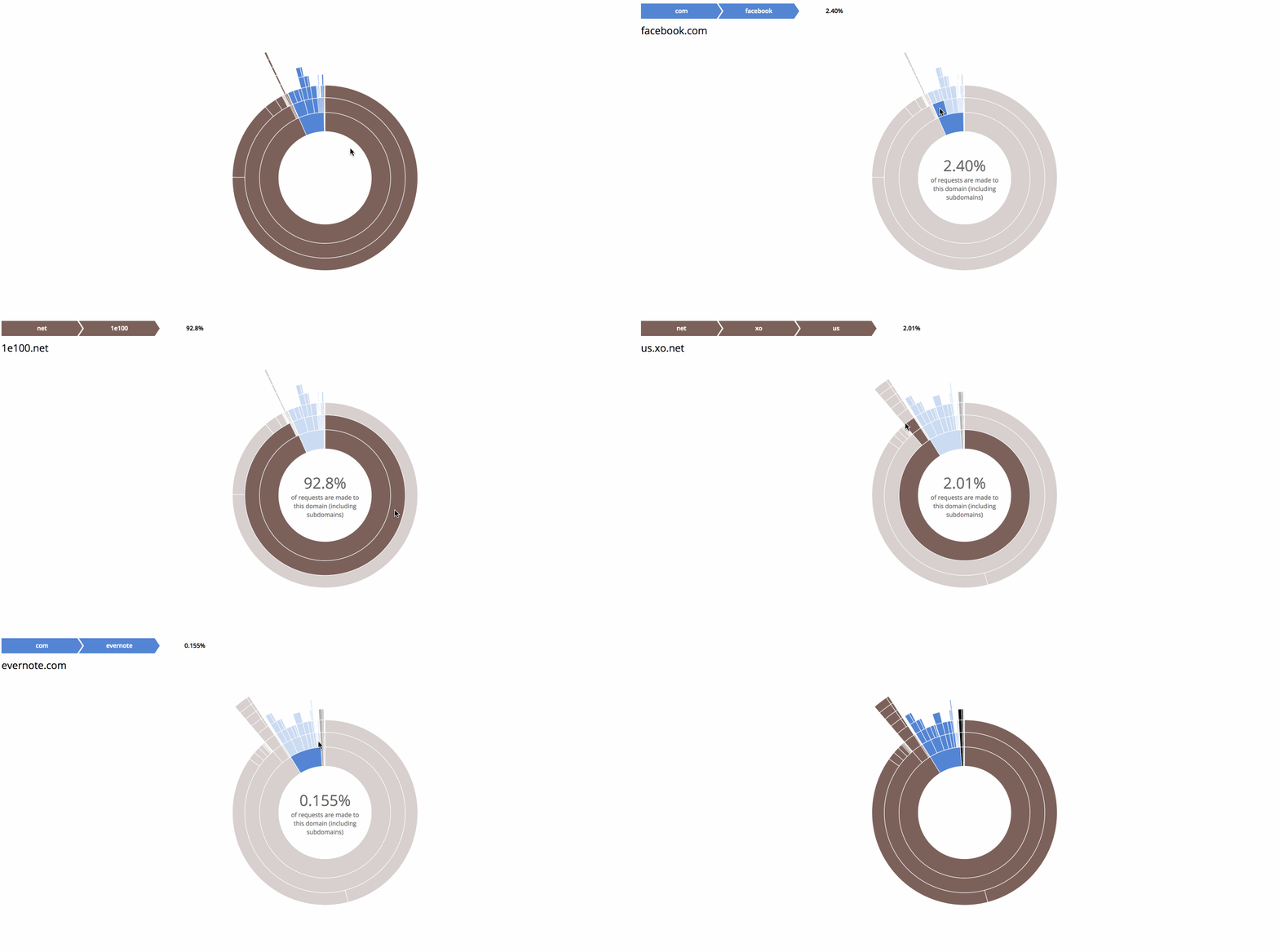
Maybe that's part of it, but it's <=1 DNS request per domain request so no more than half that circle should be DNS requests. In practice it's far, far less because web browsing typically has numerous requests per domain (e.g. loading images off facebook.com).
My best guess is VPN. Maybe that's how they link Princeton campuses together or something.
What bothers me is that neither the author nor anyone here metioned that HTTPS does leak metadata in the form of the SNI extension which provides the server with the requested host before the cert exchange.
And even without SNI (e.g. IE on XP), there must be only one SSL site hosted on that particular IP, so the attacker can just connect to it and see what site (s)he gets.
"A Shark on the Network" is more appropriate than "How to listen in on wireless network traffic" for this particular post. If it's a "how to listen in...", I would expect the article to introduce better passive attacks (in monitor mode) and raw packet injection attacks that don't require you to be associated to a particular access point, and finally the different wifi chipsets that allow you to perform these types of attacks.
I was hoping to read some recommendations on chipsets that are able to monitor multiple channels simultaneously.. but then it was just another misleading headline.


He ended up dropping the extra.
Security is not a Dark Art, and there is no harm in teaching people how or why attacks work. If you can find it at a bookstore or via a Google search, it's safe to disseminate to the general public via blog.