Hacker Newsnew | past | comments | ask | show | jobs | submitlogin
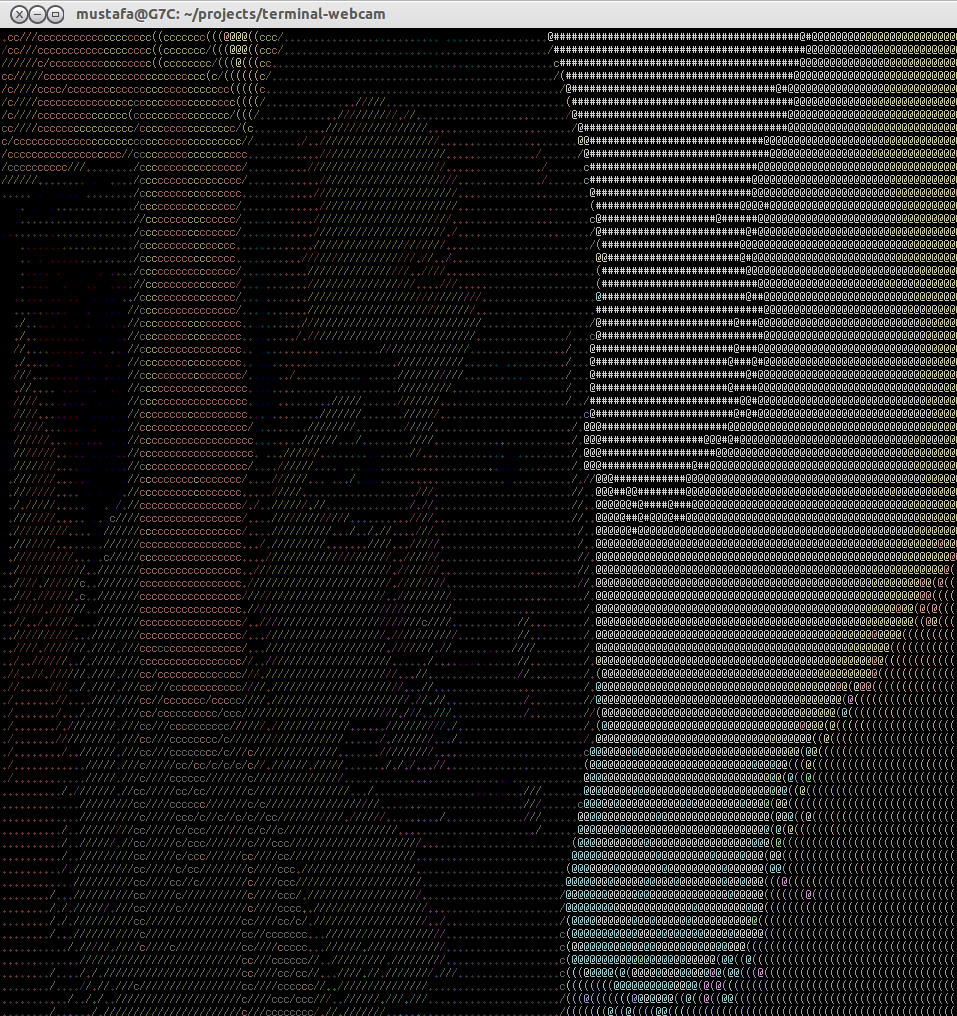
Show HN: NCurses Terminal Webcam (github.com/mustafaakin)
110 points by CSDude on April 23, 2014 | hide | past | favorite | 32 comments


MPlayer can also do this. Something like this should work as an example:

  $ mplayer tv:// -tv driver=v4l2:width=640:height=480:device=/dev/video0 -fps 15 -vo caca


For the record, that's not pure terminal (it opens up another window). This project works even in a bare vterm. I'd love to see this work over ssh.


It will draw an X11 window if there is an X display. Unset DISPLAY and it will render in the terminal: $ DISPLAY= mplayer ...

Updated command for clarity (might want to fullscreen your terminal with this):

    $ DISPLAY= mplayer tv:// -tv driver=v4l2:width=640:height=480:device=/dev/video0 -fps 15 -vo caca


Sweet, I didn't realize that. Sadly, the result flashes on and off and is essentially unusable for me (either in xterm or a TTY on Slackware64 14.0). I can tell it's working, though.

This also seems to work over ssh, though, which is cool.


Add the -quiet option to mplayer.


That fixed it. Thanks.


I can confirm it works fine at a raw terminal, even on Linux TTY. You might have to unset DISPLAY as recommended in the other comment.

One big tip for that mode of mplayer, use the 'd' key to switch dithering modes. Keep switching until you get to Floyd-Steinberg for the best quality (IMHO).


I've just given it a go, I look lush. I tried changing the width and height but it came out the same size, I think I will have to play around with it.


Interesting - I just made something exactly like this (screenshot looks exactly the same): https://github.com/billyeh/termchat! I even had to publish a Node package to do it (pixelr).

Except it's got a chat function with other users as well :)


It's still using the old OpenCV calls, so I did a quick port to OpenCV 2. https://github.com/techwizrd/terminal-webcam


Cool. You can do it also with `vlc` and the `-V aa` (ascii) or `-V caca` (colored ascii) video output in the console.

Can play any videos or stream the webcam:

    vlc -V aa file.avi
    vlc -V aa v4l2:///dev/video0


Please add encryption (on by default), sound, and hook this up to PGP so that it can be skype for hackers (and I don't mean just crackers, I mean in the most general sense)

Just in case it wasn't clear - I think this is awesome.


Well, I was going to do it (2 years ago as you can see in repo), but somehow I forgot. Now, I made NodeJS fork of it: https://github.com/mustafaakin/terminal-webcam-chat to turn it into a chat


Hack it up with existing software. Shunt the output across the network with ssh, perhaps into a shared tmux session. That takes care of text chat too. (Of course libcaca kills the tmux session, so you might have to drop the frame-rate or keep the tmux panes small).

If you want to keep it hacky and horrible, have each side also set up pulseaudio and use it's networking capabilities over ssh to make each others computers the sink for your microphones. Or use existing proper VoIP software, if you want to be practical and boring.


If you want to get full performance, use xterm, gnome-terminal and others are very slow. Colorful one uses only 6^3 colors but it looks nice: https://raw.githubusercontent.com/mustafaakin/terminal-webca... (It is currently night here mywebcam sucks on night)


This is pretty awesome. I'm surprised that you can get such a detailed and responsive image with just different characters. Very cool.


YouTube did something like this a few years ago for April Fools. I think on a modern Retina-level display it would look even more impressive due to the higher resolution and smaller character-pixels.

Also reminds me of this: http://www.oldskool.org/pc/8088_Corruption


Forget about retina displays, imagine on a VT340* in glorious sixels!

https://github.com/saitoha/PySixel

*Or even xterm compiled with sixels support ;)


The submitted program, and the mplayer incantations in the threads, are the most delightful things I've seen all day.


Neat! I made something similar for OSX: https://github.com/dhotson/txtcam / Screencast: https://asciinema.org/a/7301

I used halftone characters to do "dithering".

Someone forked and updated it to work with iTerm2's 24 bit colour support: https://s3.amazonaws.com/f.cl.ly/items/063S2A0b2b3w3T2Z3J0q/... .. not bad!


Forget looking at my ugly face, how do I watch movies in my terminal?


You're in luck:

  $ mplayer -vo caca my-movie.mp4


> Forget looking at my ugly face, how do I watch movies in my terminal?

Everything looks beautiful when rendered in ASCII.


You can change VLC's output target to the terminal. From what I understand it's only written single-threaded so it lags horribly.


OK, now how can I make this loopback such that this is what the people I'm talking to on google hangouts sees?

EDIT: duh, hangouts has a "share window" feature .. this is awesome!


See also hasciicam by Jaromil. https://github.com/jaromil/HasciiCam


This isn't mine, but it does a similar sort of thing in browser. It's actually a port of libcaca to JavaScript using emscripten:

http://experiments.coscolla.net/libcaca/

The author is this guy: https://github.com/kozko2001/libcaca.js


great work!

i did one the runs on osx a couple years ago. might be broken now, haven't run it in a while.

https://github.com/helloandre/cam2ascii


Reminds me of AAlib and bb, the portable demo.


To go up the stack a bit, it reminds me of TTYQuake. (original website gone :( )

http://ingles.homeunix.net/presos/quake/4/ttyscreen.html


Guidelines | FAQ | Lists | API | Security | Legal | Apply to YC | Contact

Search: