I gonna be generous and guess this was upvoted as top post for being maybe possibly midwit-correct, hoho you are so right good sire, reddit-fedora-tip herpdy-derp.
But it would not at all be incorrect in American English to say something was "ANSI Standard". Because everyone with more than a few braincells knows the American National Standards Institute is not the same thing as a publishment from that organization.
So please explain to me grammatically how "a standard from the Japan Standard Institute" is like "ATM machine".
> I gonna be generous and guess this was upvoted as top post for being maybe possibly midwit-correct, hoho you are so right good sire, reddit-fedora-tip herpdy-derp.
You may want to look in a mirror. Your snide tone does not add anything here.
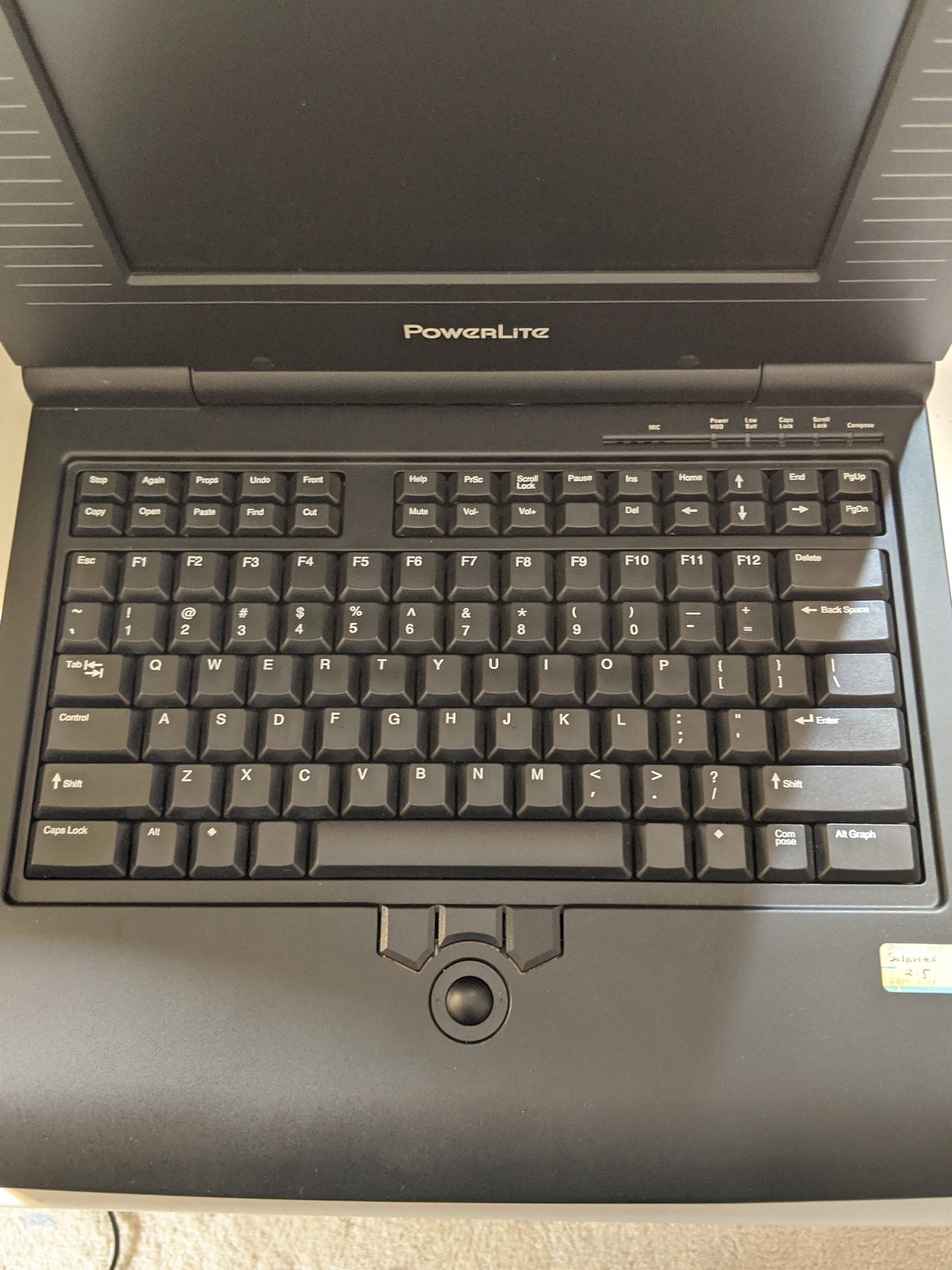
No amount of drooling over Apple keyboards will make me forget that Apple's designers didn't add keys for basic functions such as Copy and Paste, Undo and Redo.
I don't see a clear advantage over the the ZXCV shortcut placement which the Macintosh team chose. (The original Finder had no specific Redo shortcut because it was single-undo and ⌘-Z performed both undo and redo.) Even well-placed dedicated keys on a Xerox-style (or later Sun-style) "fun cluster" https://www.youtube.com/watch?v=pBiWtJJN5zk to the left of the alphabetic cluster would have forced the hand to move further away from the home row. Of course ZXCV is much less well-adapted to the left-handed, but that would probably be true of any dedicated keys as well, unless they were mirrored on both sides of the keyboard.
> […] left of the alphabetic cluster would have forced the hand to move further away from the home row.
The Star left cluster are primarily operations that pair the left hand on the keys with the right hand on the mouse. This derives from Engelbart's Mother of All Demos with the left-side keyset paired with the right-side mouse.
> The Star left cluster are primarily operations that pair the left hand on the keys with the right hand on the mouse.
Sure (this is demonstrated in the linked video, for instance) but the ZXCV group is pretty similar in that respect. Even for operations which involve the mouse it's preferable to drag only one hand far away from its home position, rather than both of them. (Especially since the video evidence https://www.youtube.com/watch?v=Cn4vC80Pv6Q seems to suggest that Star users tended to move their left hand only after making the mouse selection, instead of prepositioning it.) And the Star's Undo key, which presumably doesn't require help from mouse input and is likely to be needed after a non-mouse action, isn't placed any more conveniently near the home row: it's simply in the right side-cluster rather than the left one.
(Yes, they could have just replaced the "regular" function keys with copy/paste keys, but I feel like that would have gone over about as well as the various times they've, uh, tried to replace the function keys)
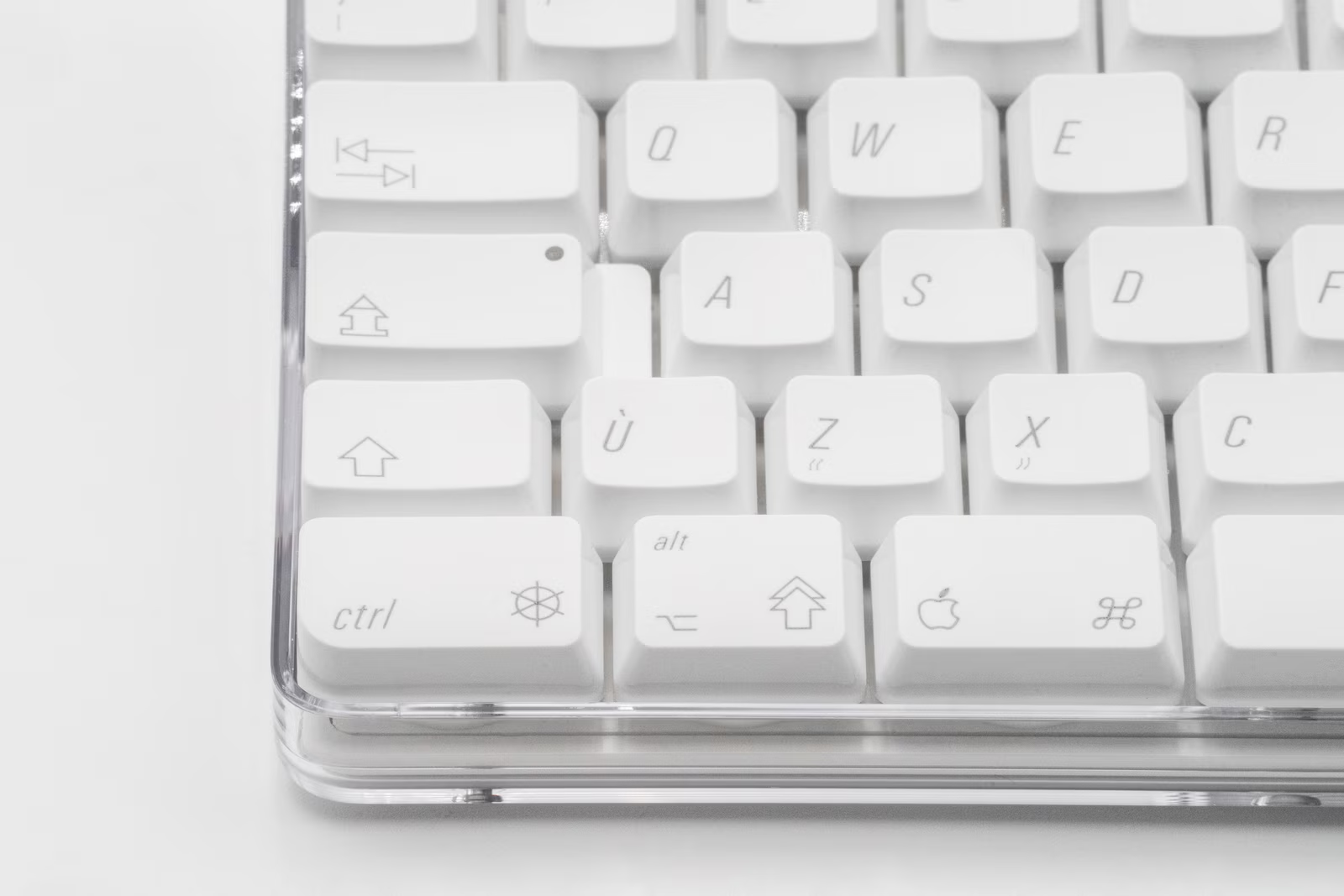
Early Mac design was excellent overall, but decided not to include these keys (maybe they were leaning towards Smalltalk-like context menus?), and then seemed to go into more cryptic and power-user in-the-know keyboard direction (like with the 3-icon key including special support for flipping burgers):
At least we get cmd and control as separate keys still, which makes copy/paste/… in a terminal a breeze, without either needing to sacrifice terminal control keys, or remember to use different c/p sequences in different scenarios.
I work primarily on Macs, but also have Windows machines on my desk. Switching to Windows, I always have to pause and think, "Wait… I'm supposed to press what to copy again?"
Conflating meta keys with control keys is one of the more pernicious abominations Microsoft saddled on the tech world.
Shift - Control - Meta - Super - Hyper. Each has its place.
Aaaah, he's got carriage return and enter mixed up. The whole reason for the symbol being an arrow returning to the beginning of the line, is because it's the return key. I love the Canadian enter symbol, an arrow pointing into a box.
No. He calls the big one Enter presumably in recognition that’s what people know it as (check how any cross-platform web app calls it), and the numpad one Return/Enter because that’s what it is collectively known as across all the platforms. This all makes sense to me. Since the keys on the photos don’t have labels, this feels better for a reader in 2026 than being overly pedantic.
Right, but if you're referring to Return as Enter, then there's no reason to refer to Enter as Return. The reason for the change is that people don't distinguish the two. If we're going to eliminate this distinction, we should do it properly!
(I've had blank looks from a few colleagues after suggesting they press the Return key (that being the term I used to refer to the Return key) - which makes me wonder what percentage of people even know that Return is the name of a key. Perhaps we should retire the term entirely.)
How would that work for all the software that distinguishes between them? The standard (see e.g. Mathematica) is for `return` to create a new line in a multi-line text field, and `enter` (`fn+return` on a keyboard without a dedicated key) to execute/evaluate/commit the field.
But Return and Enter are still functionally different keys on macOS. Return inserts a new line, Enter (and cmd-Return) submits forms (which works for Reddit comments, but not here for some reason).
Except in many apps Return submits forms and Shift+Return inserts a new line, and in many other places Return and Enter do the same thing, showing to me that those labels are already pretty meaningless. It feels like a transition a good design team could figure out, keeping the distinction for those who want it, but simplifying for the rest. I believe Windows calls these Enter and Numpad Enter, or something like that? That feels better to me.
AFAIK those are not different keys, it's the literal keyboard combination Cmd+Return that is interpreted as submission in those contexts. Ctrl often works just as well on Windows for that purpose as well.
Numpad Enter is definitely a distinct key though, but I've never seen it treated differently than Return (except for randomly not working in some contexts that accept Return)
The Canadian keyboards are so Canada: supposed to appeal to either English or French users, but just pisses them off. English speakers go for the US layout, and French speakers go for a European layout.
I remember some of our early Chromebooks had Canadian keyboards, and students and teachers revolted.
Every I know in Montreal uses the CSA/ACNOR layout if they're writing French and nobody uses AZERTY (unless you've recently arrived from France, of which many folks here have).
We were all taught to use keyboards printed in the US keyboard, but swapping the virtual layout to Canadian French when writing French, which is what I still do.
> Every I know in Montreal uses the CSA/ACNOR layout if they're writing French and nobody uses AZERTY
There are two different Canadian QWERTY keyboard layouts suited for typing French though: the one called "Canadian French" (or something similar) where most of the accents are on dead keys [0], or the one called "Canadian Multilingual Standard" (or "CSA" or "ACNOR") where most of the accented letters have dedicated keys [1].
I personally use the CSA layout, but my impression was that that's uncommon, since my French teacher thought that I was crazy when I told her I used that layout. And this comment [2] suggests something similar. But I also live in Alberta, so I'm not exactly in the best location to see what most French Canadians use :)
> We were all taught to use keyboards printed in the US keyboard, but swapping the virtual layout to Canadian French when writing French
Same here, but I had assumed that that was only because I was in Alberta where there aren't many French people/keyboards.
I think back in the day (say the late 80s) it became apparent to those in charge that this new IT thing was going to be very important in the workplace, and that it was going to be important to train up people to operate computers.
Given those in charge were probably one finger typists if that, and befuddled by technology, they would collectively have decided that computers should be standardised so that learnt skills would be transferrable, and therefore they probably imposed ideas like standardised keyboard layouts.
Of course it turned out that the next generation were totally capable of operating computers without any formal training, were totally fine with different operating systems, different keyboard layouts, different applications etc, and so there was probably lots of wasted effort solving a non-existent problem.
I'm wondering where those Canadian keyboards are used. I live in Canada, have seen plenty of multilingual keyboards, and have seen those symbols perhaps once. Even so I can't be sure it was on a keyboard. I just recognized one of the symbols.
Somewhat related: I live in France but have learnt computing on a QWERTY US keyboard back in the days, not AZERTY. As a result the only keyboard layout I can use without losing my sanity is a QWERTY US MacBook with a Canadian layout - I have my Q right where I want it, Enter key is lined up in the middle row, # $ % * are there for coding, and all the accents é è à ^ ç are there too. Thank you, Canada.
I bought my MBP in Québec, with the default keyboard they stock.
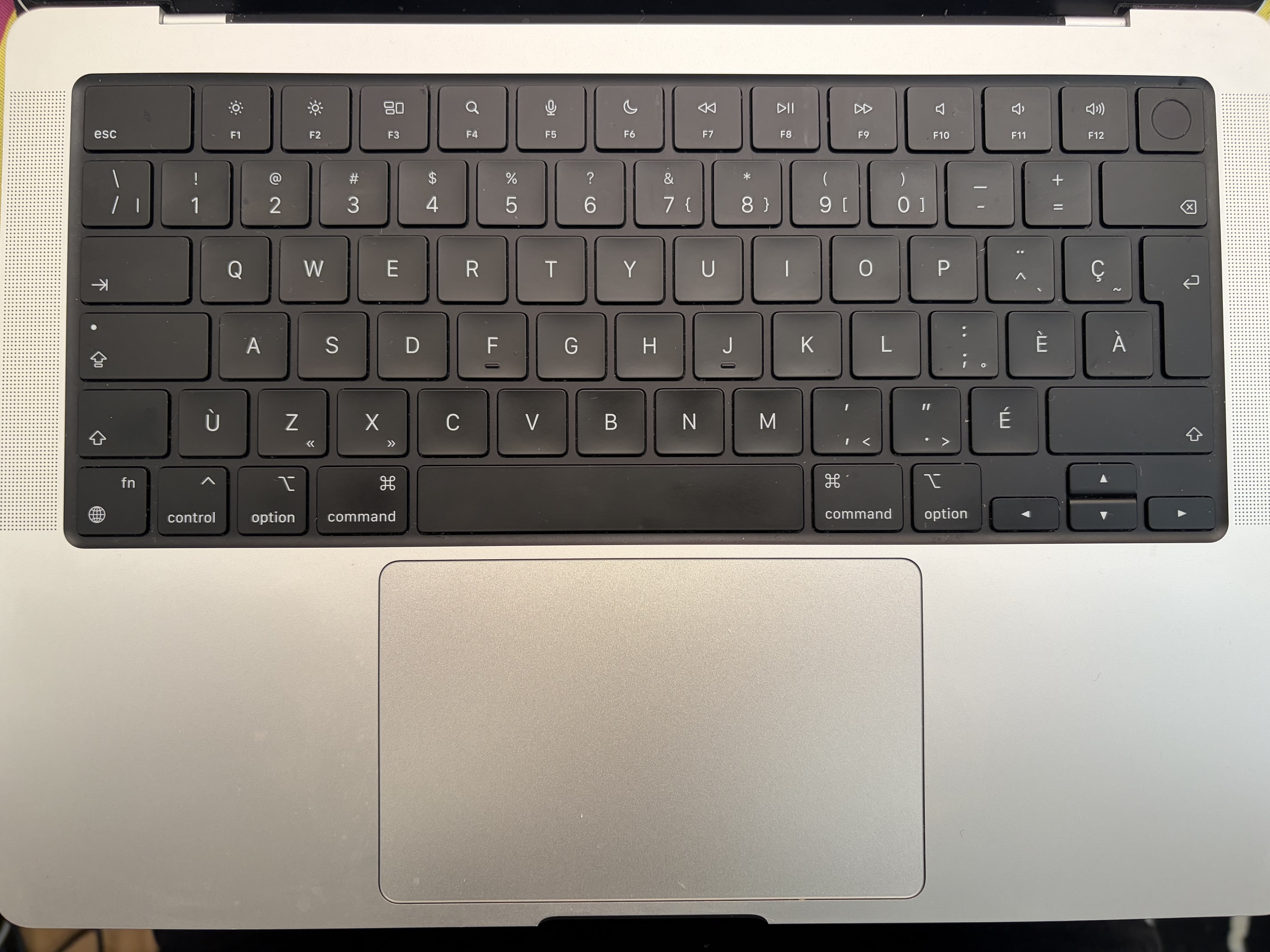
https://f.toi.sh/fr-ca-mbp.jpg (Pardon the dust!! You never really look too closely as your keyboard until you have to take a picture of it eh?)
Tab, capslock, shift, backspace, and return are all symbols-only. I feel like I have a pretty good ambient understanding of what they mean at a glance so I think I've always seen them on fr-CA layouts I've used.
Was trying to communicate to a designer in Ontario a while ago that we could use the backspace symbol for a correction key in a PIN entry view. We were working on an iOS application so I was immediately thinking that the apple default UI font would have exactly that "chevron with a cross" symbol styled how it looks on the keyboard somewhere in it. Designer was pretty confused about it though, so I think it's probably just fr-CA keyboards.
I don't think I've seen a French-Canadian keyboard before, that is so much less cursed than the AZERTY monstrosity I have from France (hold shift to type numbers! hold shift to type period and comma!)
I worked at the provincial government as an intern. We had those keyboards.
I'm willing to bet that more than 99% of the Canadian Multilingual CSA keyboards on PCs are used by public servants. There is another (French Canadian)layout that is much more common among consumers.
Of course, the Mac side is different, having somehow chosen to align with the (IMO superior) CSA layout.
> I worked at the provincial government as an intern. We had those keyboards.
Which province? Because I've never seen the CSA keyboard used here in Alberta, but it's also not terribly surprising that the Albertan government has poor support for French.
Perhaps, but I really don't know why a French keyboard would be different in Quebec compared to a French keyboard in the rest of Canada. There is a picture of a MacBook keyboard from another poster in this thread, which is what I would expect.
Probably the stores in english canada mostly just sell english keyboards (after all you can change the keymapping in OS). Maybe it would be different in a city that is 50-50, but if you are in a city that is 90-10 english, probably not a lot of people are stocking french keyboards.
I have picked up a couple laptops with French Canadian layouts over the years and have encountered said layouts in French immersion schools, so I'm no stranger to them. That said, I'm not a French speaker, so I never looked into variations.
I always find icons better than text, given that you don't know the exact linguistic background of the user. Thus for me the Canadian keyboard makes more sense than everything. I think the latest keyboards from Apple also go this direction, exchanging text for icons.
From a visual perspective I miss some of those more esoteric symbols, but the current Apple (US) keyboard gets it right. Symbols with text labels for modifiers and clear pictographs for the function keys (though the F3/Mission Control icon is a bit unclear until you click i and the behavior of F5/mic seems unhelpful). I just remember a few too many family tech support issues trying to help a struggling relative understand that command and 'open apple' are the same thing.
On the JIS 2003 model, the more traditional Control position is great (it’s how I map my boards) but the Caps Lock positioning is really good too and makes so much sense with how infrequently it’s used. Very little risk of accidentally hitting it. I wonder why more boards haven’t adopted it.
I too thought the 2003 keyboard was the best design, but for ergonomic reasons.
They did it right with respect to key shape.
- the keys were scuplted. This eliminated touch-typing problems because your fingers would find the edges of keys then self-center in the middle of a concave surface.
- the modifier keys were convex, so you could detect them easily
- you could plug the mouse into the keyboard. (though there were power problems with higher-powered mice)
I really hated it when they went to flat keyboards.
Functionality went out the window. You couldn't find the center of keys, so it was easier to make mistakes because of lack of feel.
The only nice thing I could say about them is that they were attractive to look at in a way, and the short throw was very light.
The symbols are from a weird ISO/IEC standard (9995-7 ?) that never really caught on except in a few places. I have seen the lock-key symbols more often on lock light panels than on keycaps.
All this micro-management of these standards only serves to confuse people and ultimately causes entry errors and wastes time. Go find the relevant XKCD comic on your own.
ASCII is, as people have pointed out, a 7-bit code, so it can hold only 128 characters. When they added _ and ^ to it in 01967, they had to remove the ← and ↑ characters from ASCII-1963⁂. So there was no space for any of the characters —–“”×÷£°†‡¢§•€, which are absolutely critical even for English. "National variants" of ASCII might allocate space to some of them, or to other characters like ñ which are even more critical to the languages that use them.
⁂ Smalltalk's continued use of ASCII-1963, among other things so that it could use ← as the assignment operator, is the reason that OO programmers got in the habit of using CamelCase, and are still doing so today, despite using a character set containing the underscore, and, typically, programming languages in which underscores are valid characters
ASCII is a 7-bit code, so there are only so many symbols one can add. Prior to ASCII, you had codes that used as few as 5 bits. Early C had the option to use digraphs to represent various forms of parenthesis, simply because symbols like {} and [] were not universal.
(Strictly speaking, people did continue adding symbols. We used to talk about code pages: when the MSB was 0, the other 7 bits were ASCII. When the MSB was 1, the other 7 bits were a user selected code pade.)
Many European layouts do have more symbols outside ASCII. For example German has ° (degree) and ß (ess-tset) and § (paragraph).
German PC keyboards also tend to have µ on the M key, but it is available with the right Alt key.
Macintosh keyboard layouts tend to have many symbols on Option-combinations but they are not always printed.
ASCII is 7-bit and fully filled out. Every other extended character system prior to Unicode was sporadically supported. C has digraphs and trigraphs because even the ASCII punctuation wasn't guaranteed to be available on all keyboards. IBM, notably had an APL typeball for their Selectric derived terminals but that was equivalent to switching character sets and not something that could be considered universal prior to Unicode.
> You turned it sideways. Using a colon, a dash, and a parenthesis character in series, you could make a sideways smile or frown. It looked like this: [happy-face] or [sad-face]
Click on the HN discussion > Click on the article > Notice the weird CMS error > Copy the sentense > Click back > Click back again by mistake(?) > Click on the discussion of the wrong article (?) > Paste the sentence > Notice that HN eat the emoji > Add the version in brackets.




is a particularly humorous instance of https://en.wikipedia.org/wiki/RAS_syndrome
reply