Yeah I'd love to know what this is aiming for over WezTerm, which already supports both WebGPU and OpenGL rendering. Maybe just that it is closer to being able to run in a browser?
I have to take a moment to just evangelize WezTerm a bit. I switched over from iTerm in the last few months and IMO WezTerm's absolute killer feature is its Lua-based configuration. You can do so much with it, down to running scripts on key binds, and the API is powerful enough to do virtually anything you want. For example I have some key binds that act differently when the active pane is running emacs vs. a shell.
Meanwhile I have to wonder what's the selling point of these over good old urxvt? It has an ecosystem of perl plugins, which has all the batteries I need and more. In its daemon/client mode I can have 20+ terminal windows open and they consume sum total of like 30MB memory, with embedded perl interpreter and everything. I feel like one or two instances of these modern incarnations is enough to completely dwarf that number.
GPU rendering is really cool, but I don't really understand what might people be doing where CPU rendering in terminal is anywhere close to being a bottleneck. People lose ability to comprehend way before that, why would I want gibberish to be printed even faster? Redirecting output to a file (or /dev/null) is almost always what I would want?
Well, if you search for these projects yourself and read the first few paragraphs on their websites, you might learn the selling points. Warp has a lot of features that are just not possible in urxvt.
Having seen them, there are two things I have to say:
1. I wouldn't say there really is much that would be "just not possible" in urxvt. If you drop down to Perl level, you can do almost everything (albeit you would have to write Perl).
2. The reason urxvt doesn't have majority of those selling points is because they arguably aren't the concern of terminal emulator at all. Things like better autocomplete menu, command editing, history browsing etc. historically fell under purview of the shell. You can have all these things with say zsh and a few chose plugins.
Had that problem for a while too, but you can actually really easily set the TERM variable for every ssh connection separately from your local TERM. Just put the following in your ~/.ssh/config:
Kitty isn't "xterm-256color". That's something that Thomas Dickey, and I, and others, have pointed out time and again. It's just plain wrong to say to programs that something is XTerm when it isn't.
The problem that people have is different anyway. When they're doing things correctly, and setting the correct terminal type, they then face "But my terminfo on that Linux distribution DVD that I got isn't up to date!", or "But my termcap on FreeBSD isn't up to date!".
The answer to that problem is to point out that terminfo supports a local ~/.terminfo/ if one needs one, and FreeBSD termcap has a TERMPATH environment variable that one can point at a ~/.termcap.db file, or indeed one placed anywhere else, if the system termcap database isn't up to date.
I'm not sure what to make of this. The terminfo you linked suggests to me that kitty provides at least the same capabilities as xterm-256color, unless I'm understanding the "use" capability wrong.
Most machines I've SSHed into didn't have kitty's terminfo installed, which results in many things not working. Using xterm-256color as a safe fallback has always worked for me however. It would always be possible to define the TERM variable per host and use TERM=kitty for hosts that have the correct terminfo installed. Is there a drawback to that apart from not being technically correct?
It's plain not correct. There's no "technically" about it.
Yes, you have misunderstood what xterm+256colour is. It's not xterm-256color. Notice the plus sign. What entries with plus signs in are is actually explained in commentary in the terminfo source file itself.
The full difference between the two entries is obtainable with infocmp, but that's just details. The simple fact is that for anything that isn't XTerm the xterm entries in terminfo/termcap are wrong. The few terminals that are close enough to XTerm to be for practical purposes compatible are the ones that were actually branches of actual XTerm at one point. All of the others, especially the recent ones like Alacritty, Kitty, and the like, are markedly and intentionally different.
The drawbacks in general are various and range from the subtle (e.g. some supposedly compatible terminal emulators mix up the home/end key codes with the find/select key codes, or they'll use different codes for higher numbered function keys, or for keys with modifiers) to the blatant (e.g. there are stark differences in indexed and direct colour support amongst terminal emulators). There's plenty of just plain odd along the way. I used the wrong TERM value for something the other day, and suddenly the Z shell's line editor was putting the cursor in column 80 all of the time.
The thing to remember is that one isn't helpless with respect to getting a proper terminfo/termcap entry installed on systems that don't have it. It's 2023, and not only has terminfo had the ability for users to supply extra terminfo entries for a long while, but historical termcap has gone away, and the few remaining systems such as FreeBSD that still use termcap can also just plonk in user-supplied termcap entries. They, too, nowadays have a mechanism for this. There's really zero excuse for not just copying the proper entry over and using it if it isn't there, nowadays. Indeed, Kitty even reportedly has a helper utility for hand-holding one through the process.
Kitty also has the benefit of supporting much better keyboard handling through key codes. This includes things like button press/release/repeat, other keyboard modifiers and better escape handling. More details: https://sw.kovidgoyal.net/kitty/keyboard-protocol/
It's really a shame that more terminals don't support this protocol, because we could have a lot more sophisticated terminal applications.
Thanks for the recommendations! Since switching from Kubuntu to Ubuntu, I have been looking for a replacement for Konsole and had finally settled on Terminator, but one major gripe I have with it is searching the scrollback, which is a bit buggy (results aren't highlighted, search is case sensitive even though it's not supposed to be). I just tried Wezterm and it seems to tick all the boxes. Now I just have to figure out how to configure it, seems a bit more complicated than most other terminal emulators...
This is anyway a niche market on Linux - you can go really far with gnome/kde default terminals, and even slimmer ones like xterm/urxvt/st are more than enough to perform all the necessary tasks.
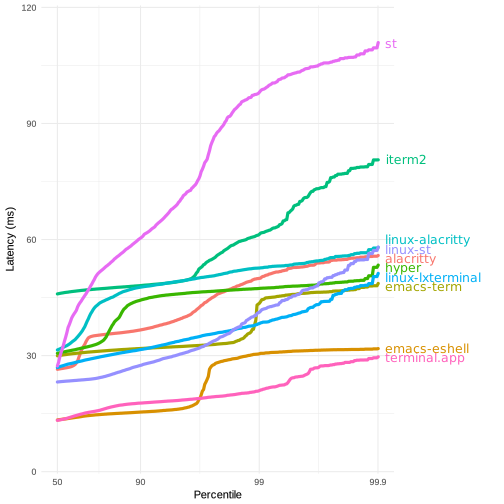
Perhaps, on Mac, you badly need an alternate terminal app , because the default one is unbearably slow.
Input latency might be good with Terminal.app, but it really chugs when there's a lot of output scrolling on the screen, especially if you use a terminal multiplexer. The last time I 'lived' on macOS, I had to ditch Terminal.app within a day, just from having a few apps compiling and printing logs in a tmux window.
You can't attack another user like this and we ban accounts that do, so please don't do it again. Your comment would have been fine with just the second part.


- Alacritty minimal and blazingly fast
- Wezterm with batteries included
- Warp even batteries included